Unleashing the Future of AI-Powered QA Chatbots: Streamlit + Langchain Retrieval QA + ChatGPT
In a revolutionary breakthrough, the boundaries of AI-driven Question Answering (QA) Chatbots have been shattered. Imagine a QA Chatbot that requires zero training and can effortlessly handle complex queries like a seasoned expert. The ultimate combination of cutting-edge technologies: Streamlit, Langchain Retrieval QA, and ChatGPT, culminating in an awe-inspiring AI-powered experience like never before. I will share the code at the end.
Let’s talk about these 3 leading technologies:
Streamlit
Well if you are a Python developer, an AI expert, etc. you probably need to improve at the design side of the things like me. Streamlit comes to your help for these times.
Streamlit turns data scripts into shareable web apps in minutes. All in pure Python. No front‑end experience required.
Langchain
We will talk more about this. I will drop the official introduction below:
LangChain is a framework for developing applications powered by language models. It enables applications that are:
- Data-aware: connect a language model to other sources of data
- Agentic: allow a language model to interact with its environment
The main value props of LangChain are:
- Components: abstractions for working with language models, along with a collection of implementations for each abstraction. Components are modular and easy to use, whether you are using the rest of the LangChain framework or not
- Off-the-shelf chains: a structured assembly of components for accomplishing specific higher-level tasks
Off-the-shelf chains make it easy to get started. For more complex applications and nuanced use cases, components make it easy to customize existing chains or build new ones.
ChatGPT
We all know this part… So let’s start building!
Data Loading
To answer questions, we need something to look at. Langchain has tons of different data loaders in langchain.document_loader. We will use only three of them.
from langchain.document_loaders import PyPDFLoader, TextLoader, UnstructuredURLLoaderPyPDFLoader: It reads the pdf file, and creates a Document object for every page. You need to install the pypdf library to use it.
TextLoader: It reads the contents of a txt file, and creates a Document object.
UnstructuredURLLoader: It reads the body of the URL and returns every element as a doc. You need to install unstructured python-magic libraries to use this class. If you are on Windows install python-magic-bin too.
Loading pdf and text files is very easy and similar
def load_text_file(file_path: str) -> Document: doc = TextLoader(file_path, encoding='utf-8').load()[0] return docdef load_pdf_file(file_path: str) -> List[Document]: loader = PyPDFLoader(file_path) docs = loader.load() return docsWebsite loading is a little bit longer because we need to post-process it because they are mostly full of irrelevant text that needs to go to the thrash.
def load_website(url: str) -> Document: """ Loads a website and returns a Document object. Args: url: Url of the website. Returns: A Document object. """ doc = UnstructuredURLLoader([url], mode="elements", headers={ 'ssl_verify': "False", }).load() processed_docs = [] # We are not rich, we need to eliminate some of the elements for i in range(len(doc)): # This will make us lose table information sorry about that :( if doc[i].metadata.get('category') not in['NarrativeText', 'UncategorizedText', 'Title']: continue # Remove elements with empty links, they are mostly recommended articles etc. if doc[i].metadata.get('links'): link = doc[i].metadata['links'][0]['text'] if link is None: continue link = link.replace(' ', '').replace('\n', '') if len(link.split()) == 0: continue # Remove titles with links, they are mostly table of contents or navigation links if doc[i].metadata.get('category') == 'Title' and doc[i].metadata.get('links'): continue # Remove extra spaces doc[i].page_content = re.sub(' +', ' ', doc[i].page_content) # Remove docs with less than 3 words if len(doc[i].page_content.split()) < 3: continue processed_docs.append(doc[i]) # Instead of splitting element-wise, we merge all the elements and split them in chunks merged_docs = "\n".join([doc.page_content for doc in processed_docs]) splitter = RecursiveCharacterTextSplitter(chunk_size=1000, chunk_overlap=100) processed_docs = splitter.split_text(merged_docs) processed_docs = [Document(page_content=doc, metadata={'url': url}) for doc in processed_docs] return processed_docsTo summarize the steps quickly:
- Read the HTML
- Filter all elements that are not a meaningful text
- Filter all elements that contain links with empty text
- Remove all extra spaces and filter out all elements with less than 3 words.
- Merge all texts and split them into chunks
Okay, we load the data what’s next? Before continuing, we will learn about a prompting technique.
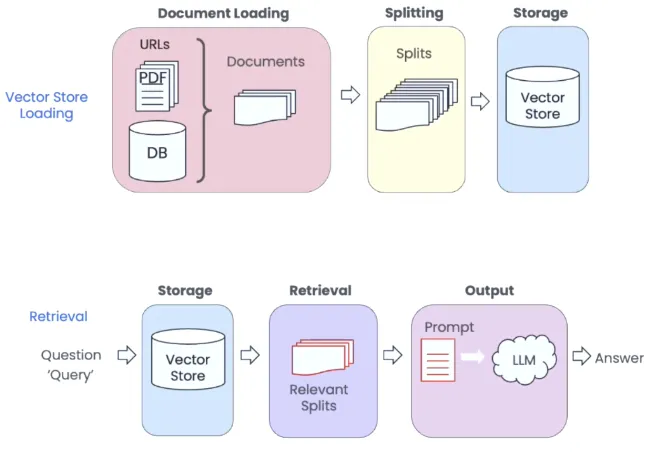
Retrieval Augmented Generation

We’re facing two primary issues. Firstly, LLMs such as ChatGPT have difficulty reading lengthy texts, and even if they can, it’s an expensive process. Additionally, irrelevant details in the text can add noise and reduce answer quality, making it a waste of money. Secondly, LLMs tend to generate false information, which can lead to incorrect answers. To address these issues, we aim to provide only the essential context in the prompt and restrict the model to use only this context to answer the question.
- LLMs (or at least ChatGPT) cannot read very long text, even if it can it will be costly to do that. Even if we accept the cost, lots of irrelevant information about our question is a waste of money and it will introduce noise and reduce answer quality.
- LLMs like to hallucinate and gives false information.
To solve these problems, we want to include only the necessary context to the prompt and make the model use only this context to answer the question.
The algorithm:
- Read all the documents you have, and split them into smaller chunks(a hyper-parameter).
- Create embedding vectors of these chunks. Store these vectors in a vector store.
- When a query/question comes, create an embedding vector of the query and search for the most similar
kchunks. - Add the question and the selected chunks to the prompt and get the answer from the LLM.
For the third point, there are some optimization methods but I invite you to search it yourself :) Now let’s go back to practice again!
Data Indexing
After we split out data into chunks, we can store it in a vector store.
from langchain.indexes import VectorstoreIndexCreatorfrom langchain.vectorstores import DocArrayInMemorySearchfrom langchain.vectorstores.base import VectorStoreRetrieverdef create_index(docs: List[Document]) -> VectorStoreRetriever: """ Creates a vectorstore index from a list of Document objects. Args: docs: List of Document objects. Returns: A vectorstore index. It searches the most similar document to the given query but with the help of MMR it also tries to find the most diverse document to the given query. """ index = VectorstoreIndexCreator( vectorstore_cls=DocArrayInMemorySearch, text_splitter=RecursiveCharacterTextSplitter(chunk_size=1000, chunk_overlap=100), ).from_documents(docs) return index.vectorstore.as_retriever(search_type='mmr')VectorstoreIndexCreator automatically creates embeddings of the documents using OpenAIEmbeddings and stores the embeddings in memory.
To make this article not too long, I will not show the prompts here but we have 1 prompt. It is for generating the question that is suitable for searching in the vector store using the conversation history.
Model Creation
We have documents, we have a vector store and we have our prompts. Now let’s put them together and create our bot.
from langchain.chat_models import ChatOpenAIfrom langchain.chains import ConversationalRetrievalChainfrom langchain.prompts import PromptTemplatefrom prompts import QUESTION_CREATOR_TEMPLATE # This is a file I put the prompts@st.cache_resourcedef load_chain(file_name: str, file_type: str): if file_type == "text/plain": docs = load_text_files([file_name]) elif file_type == "application/pdf": docs = load_pdf_files([file_name]) elif file_type == "text/html": docs = load_website(file_name) else: st.write("File type is not supported!") st.stop() retriever = create_index(docs) condense_question_prompt = PromptTemplate.from_template(QUESTION_CREATOR_TEMPLATE) chain = ConversationalRetrievalChain.from_llm( ChatOpenAI(model_name="gpt-3.5-turbo", temperature=0), retriever, condense_question_llm=ChatOpenAI(model_name="gpt-3.5-turbo"), condense_question_prompt=condense_question_prompt, verbose=True, ) return chainst.cache_resource is used to cache the embeddings and our LLM in memory to not create embeddings again and again.
PromptTemplate is used to insert the necessary context and the question to the prompt.
ChatOpenAI will be used as the LLM. The default model is chatgpt-3.5. One LLM is used to create an answer and the other one will be used to create the standalone question to make searching better. I didn’t like the prompt to create the question so changed it to a better prompt.
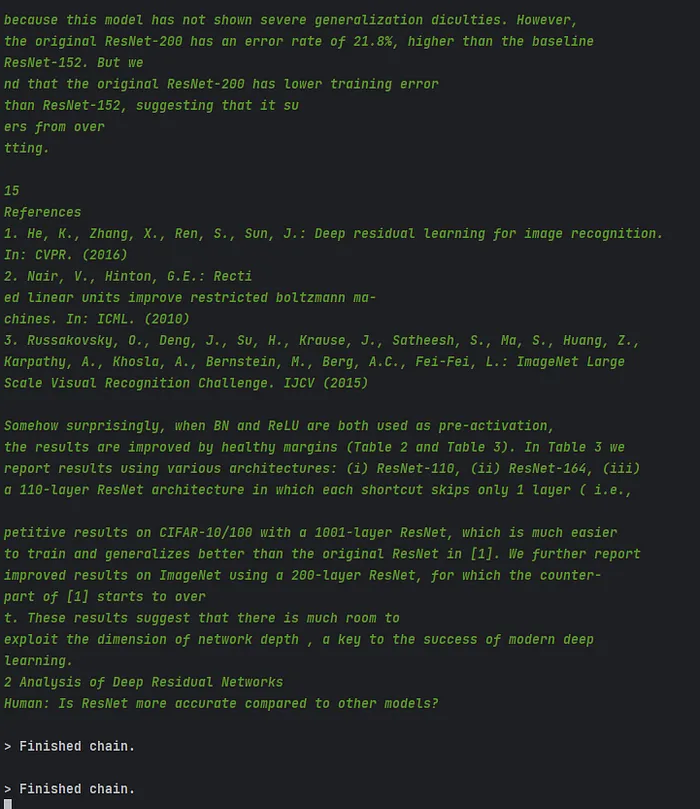
verbose will print out what is behind the scenes
Lastly, to create meaningful questions, we need to know about our chat history. There are lots of ways to store memory:
- Saving all the conversation
- Saving last
kmessages - Creating a summary after
kmessages/tokens - …
In this example, we will use the second one. We generally only need the last 3 messages to get the context and create questions. No need to use our money for more.
from langchain.memory import ConversationBufferWindowMemorydef load_memory(st) -> ConversationBufferWindowMemory: """Load memory from session state Args: st: streamlit object Returns: memory_loader: ConversationBufferMemory object """ memory = ConversationBufferWindowMemory(k=3, return_messages=True) if "messages" not in st.session_state: st.session_state["messages"] = [ {"role": "assistant", "content": "How can I help you?"} ] for index, msg in enumerate(st.session_state.messages): st.chat_message(msg["role"]).write(msg["content"]) if msg["role"] == "user" and index < len(st.session_state.messages) - 1: memory.save_context( {"input": msg["content"]}, {"output": st.session_state.messages[index + 1]["content"]}, ) return memoryIt takes a streamlit object as input. Check if there is a message from the last session. If yes load them to the memory, otherwise start with a welcome message. We will give this history to the model when we call it with user input.
os.environ["OPENAI_API_KEY"] = "sk-blablabla"st.set_page_config(layout="wide")st.title("💬 QA Chatbot")# Get a fileuploaded_file = st.file_uploader("Choose a file", type=["txt", "pdf"])st.header("Or you can give a url")url = st.text_input("Url to parse")if uploaded_file is not None or url: if uploaded_file: # Save the file with open(uploaded_file.name, "wb") as f: f.write(uploaded_file.getbuffer()) chain = load_chain(uploaded_file.name, uploaded_file.type) else: chain = load_chain(url, "text/html") st.write("## 🤖 Chatbot is ready to answer your questions!") memory = load_memory(st) if question := st.chat_input(): # Get and save the question st.session_state.messages.append({"role": "user", "content": question}) st.chat_message("user").write(question) # Get an answer using question and the conversation history response = chain( { "question": question, "chat_history": memory.load_memory_variables({})["history"], } ) answer = response["answer"] # Save the answer st.session_state.messages.append({"role": "assistant", "content": answer}) st.chat_message("assistant").write(answer)And we are done! You can check the code from the GitHub repository and ask any questions you have!